Texts and calls
The Netflix payment failed email and text, taken apart
Updated 6 September 2026
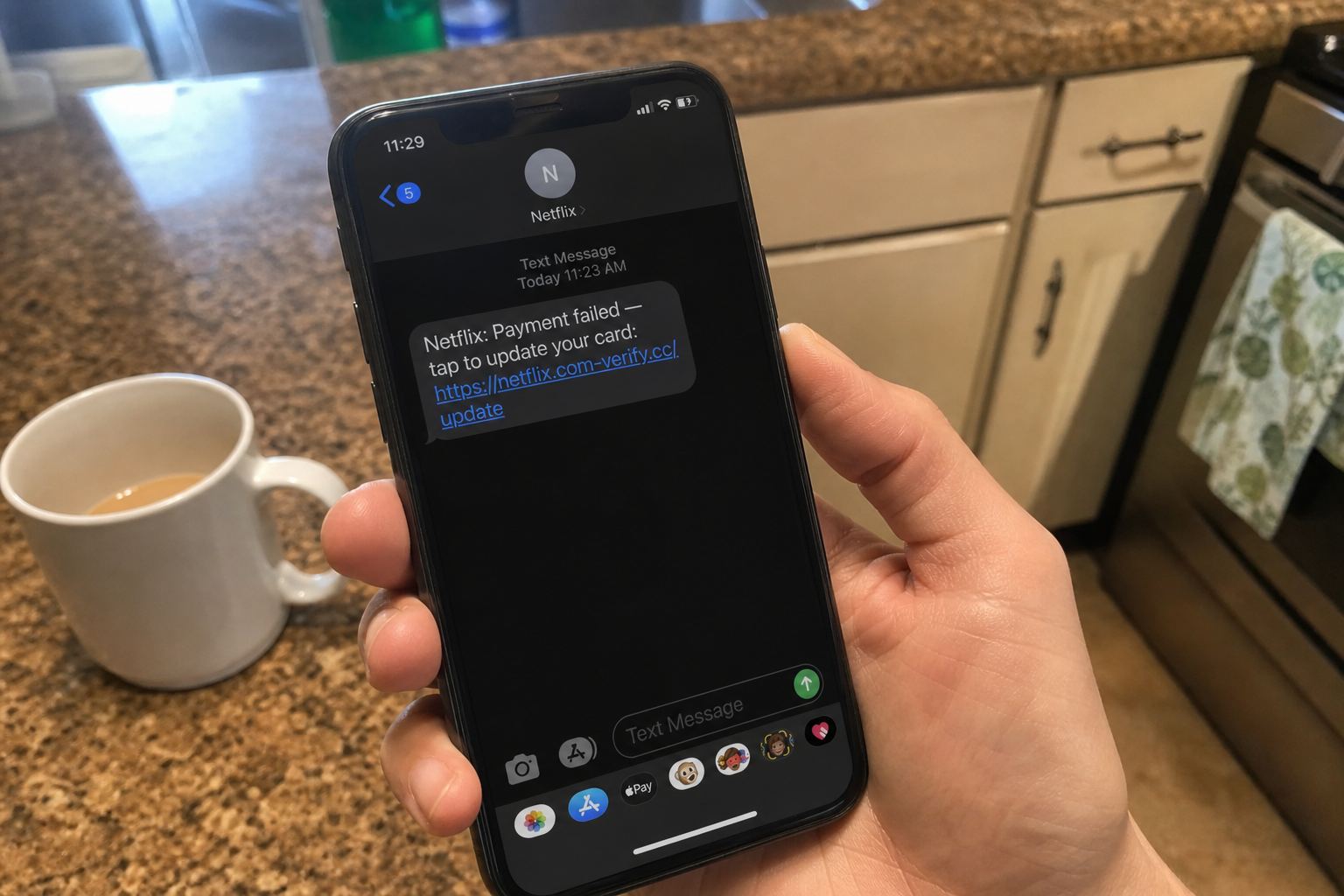
The question isn't really "is this Netflix message fake." It's "does my Netflix account actually have a billing problem right now," and the message in front of you cannot answer that, so don't tap the button inside it. Go check the account instead. Open the Netflix app yourself, or type netflix.com into the address bar, sign in, and look at Account. A real billing problem shows up right there on your account page. If the account page looks normal, the message was fake, and you can stop worrying about it.
- 1netflix-account-update.com is a fake domain, not netflix.com
- 248-hour suspension threat is fake urgency, not how holds work
- 3"Netflix Billing" sender name is free text, not proof of identity
That's the whole answer. The rest of this page is why the fake ones look so good, and what the current 2026 versions actually say.
Why this scam works on careful people
Streaming billing failures are genuinely common. Cards expire. Banks reissue numbers after a breach. A charge gets declined because you were traveling. So a "payment failed" notice doesn't land like an attack, it lands like a chore you forgot about.
Netflix really does put accounts on hold after a failed payment, and it really does email you about it. Same for Spotify, Disney+, and Amazon Prime. The scam is a copy of a boring, real thing, which is exactly why it beats people who would never fall for a lottery win.
The sender address tell, and where it stops working
Netflix sends its mail from netflix.com and mailer.netflix.com. The address most people see on real notices is info@mailer.netflix.com. Fakes use addresses that read correctly at a glance and fall apart when you look: support@netflix-billing.com, billing@netflix-account-update.com, and endless variations.
Disney+ fakes follow the same pattern with senders like @disneyplus-billing-update.com or @notice-disney.support. Spotify fakes tend to skip the disguise entirely and send from a random unrelated domain, betting you'll only read the logo.
Here's the part that trips people up. On a phone, your mail app usually shows only the display name, and the display name is free text the sender chooses. "Netflix Billing" costs nothing to type. Tap the name to expand the real address, then read the domain from right to left: the owner of the domain is the last two words before the first single slash. In netflix.billing-secure.com, the owner is billing-secure.com, and Netflix has nothing to do with it.
Be honest about the limit, though. A wrong sender address proves a fake. A right-looking sender address proves nothing, because display names lie and forwarded mail gets mangled. That's why the fix is always to check inside the app instead of grading the email.
The urgency window is the loudest tell
Nearly every version of this gives you a countdown. Forty-eight hours to update billing. Twenty-four hours before "permanent suspension." One Disney+ variant threatens that you'll lose your watch history, your profiles, and your downloaded titles if you don't act within 48 hours. A Spotify version gives you 48 hours before Premium is suspended.
None of that matches how these companies actually behave. When a Netflix payment fails, the account goes on hold and you can restart it whenever you get around to fixing the card. Your profiles and viewing history sit there waiting. Nothing gets deleted on a two day timer, and no real streaming service threatens your data to make you type a card number faster.
What the fake page asks for that the real one never would
The good fakes run two screens. Screen one is a copy of the sign-in page and takes your email and password. Screen two says it needs to verify your payment method and takes the full card number, expiration, CVV, and billing ZIP. Some go further and ask for date of birth or the last four of your Social Security number, which no streaming service has ever needed.
Netflix states plainly that it will never ask you to share personal information in a text or email, and it lists card numbers, bank account details, and your Netflix password specifically. It also doesn't take payment through third party sites. If a page reached from a message asks for your password and then your card on a separate domain, that's the scam, every time.
New tricks in the 2026 batch
Two things changed recently. Fake Netflix billing emails started arriving with an attachment stuffed with random filler text, which appears to help them slip past spam filters that judge messages by content. If a billing notice has a pointless attachment, that's a bad sign, and you shouldn't open it.
The other change is personalization. Plenty of these now include your real email address and sometimes a username pulled from an old data breach, so the message feels like it knows you. It doesn't. It knows a leaked database.
Some versions also drop a QR code into the email or into a mailed letter, betting you'll scan it with a phone where the link is hard to inspect. You can decode the image first and see the destination without going there using our QR code checker. Same habit, whatever the brand on the letterhead.
How to check billing safely, service by service
- Netflix: open the app, tap your profile icon, then Account. On the web, sign in at netflix.com and open Membership and billing. Your next payment date is listed there, and real account notices appear in the Notifications section of your account.
- Spotify: go to spotify.com yourself, sign in, and open Account, then Manage your plan. Don't use a link from the message.
- Disney+: in the app, open your profile and then Account. Subscription status and billing sit on that screen.
- Amazon Prime: Account and Lists, then Prime Membership. Amazon also keeps a Message Center that shows every genuine email it has sent you, which is the fastest way to catch a fake.
- Your bank: the real ground truth. If the card was charged or declined, your bank app knows. If there's no failed charge, there was no billing failure.
If the message claimed to be Apple rather than a streaming service, the checking path is different and the stakes are higher, because an Apple account holds your photos and your other logins. That version is covered in the piece on fake iCloud storage and Apple Account messages.
If you already typed your card in
Move in this order. Call your bank using the number printed on the back of the card, not any number from the message, and ask them to freeze and reissue it. Change the password on the streaming account, then change it anywhere you reused it, because the password is often worth more to them than the card. Turn on two step verification wherever the service offers it.
Then expect a follow up. A common second act is a phone call from "fraud prevention" a day or two later, sometimes with a spoofed caller ID, sometimes with a voice built from a few seconds of audio. Our page on how voice cloning scams work covers that, and the broader cleanup checklist in what to do after scanning a scam QR code applies just as well to a phishing page you typed into.
Where to report it
Forward the email to phishing@netflix.com with the original headers intact, which means forwarding rather than screenshotting. For scam texts, forward the message to 7726, the short code most US carriers use for spam reporting. File it with the FTC at reportfraud.ftc.gov. Reporting won't get money back, but it takes about a minute and it does feed the takedown lists.
Don't reply STOP to a scam text. Legitimate senders honor it, scammers read it as confirmation that a real person is holding that number.
What this usually costs people
Less than the headlines suggest, if you catch it early. This is a volume scam. Nobody picked you, and the usual damage is one card that a bank replaces in a week. The password reuse is the part that quietly costs people more, because a streaming password is often the same one guarding an email account.
Forwarding to 7726 was built for plain SMS, and I couldn't confirm it still works reliably for RCS and iMessage style messages on every carrier. If the forward fails, screenshot the message and report it through your phone's built in junk reporting instead. Then keep an eye on what arrives next. When the following message claims to be your bank rather than a streaming service, you're looking at a much more expensive script, and the page on fake bank fraud alert texts lays out the callback that does the real damage.
Quick answers
- My card really did expire.
- Update it inside the app, not from the text.
- I already typed the card.
- Call the issuer. Then read I typed my card.
This is general safety information, not legal advice. Scams change. If you need an official desk: FTC ReportFraud or IC3.