Texts and calls
Fake iCloud storage full and Apple ID locked messages
Updated 6 September 2026
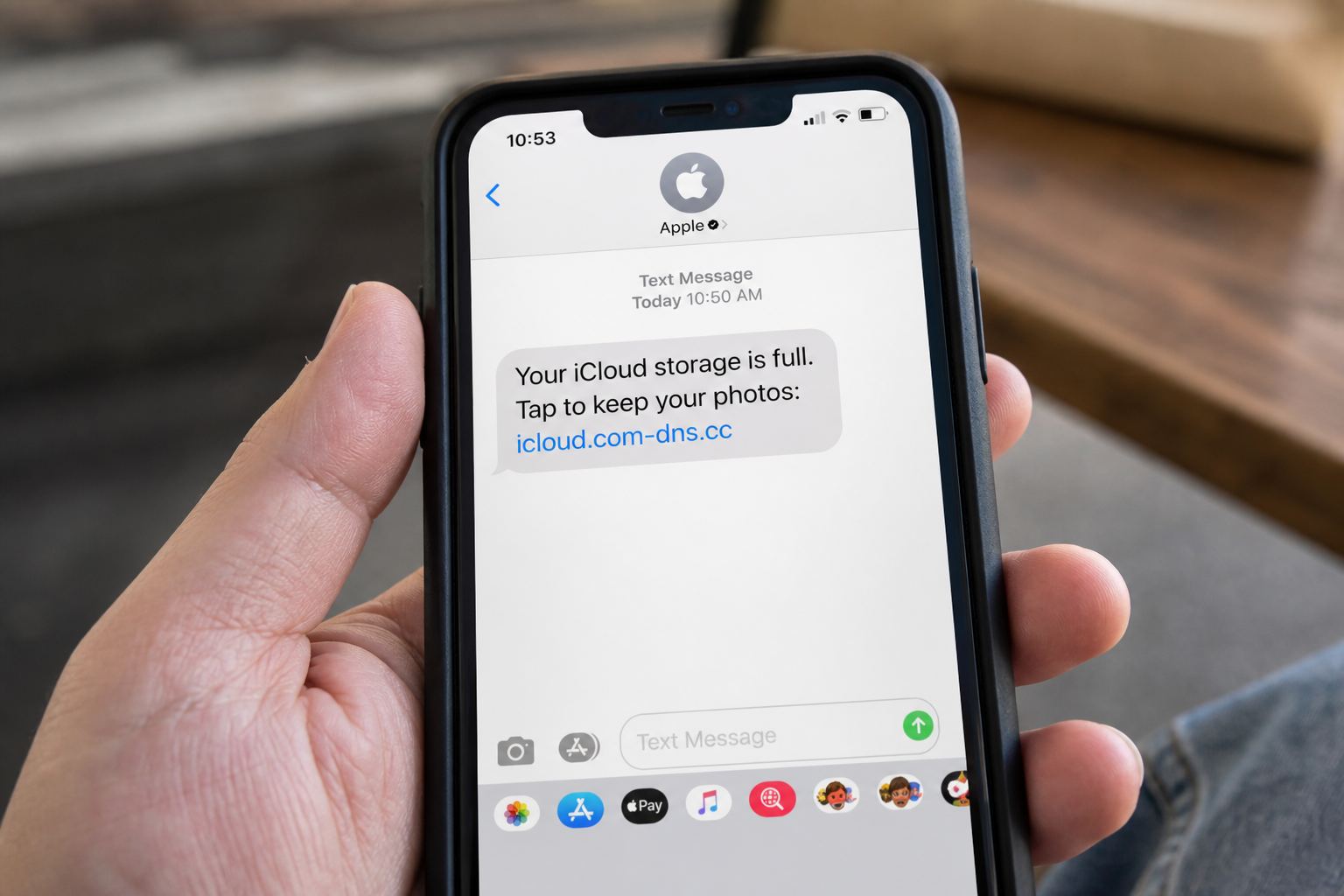
Open Settings, tap your name, then tap iCloud, and look at the storage bar. Do that before you touch anything in the message. A text or email saying your iCloud storage is full, or that your Apple Account is locked, with a link to fix it, is phishing, and the Settings screen is where the truth about it lives. If Apple isn't warning you there, nobody at Apple sent you that message.
- 1apple-idverify.com isn't Apple, real links end in .apple.com
- 2Genuine storage alerts appear in Settings, never a texted link
- 3A 2-day deadline is the manufactured urgency these texts use
- 4Apple never asks for your password or code in a message
That check takes about ten seconds and it's the only one that matters. Everything below is what these messages say right now, why they're built the way they are, and what to do if you already tapped.
The storage version and the lockout version
The storage version is the most common. It claims your iCloud storage is full, that photos and videos will be deleted on a specific date, and that you need to upgrade to iCloud+ to keep them. A campaign running through 2026 priced the bait at 99 pence or 99 euro cents a month, which is worth knowing if you're in the US, because a British or European price tag on an "Apple" email you received in Ohio is a fairly loud signal.
Email subject lines in that same family include lines like "We've blocked your account!" and "Your payment method has expired!" The deadline in these is almost never far off. Two days is typical.
The account version is blunter. "Your Apple ID will be locked within 24 hours." "Your account will be deleted in 24 hours unless you verify your identity." A newer variant skips the threat and claims a charge was made at an Apple Store, complete with a case number and a link to dispute it, which works on people precisely because disputing a charge feels like the safe, responsible move.
The domain tell
Every one of these needs you to land on a page that isn't Apple's. The domains seen in the wild look like apple-idverify.com, apple-support-alert.net, and apple-security-check.com. A slicker trick uses a subdomain, so you get something like account-verify.appleaccount.com, where the actual owner is appleaccount.com and Apple owns none of it.
Read domains right to left. The owner is the last two labels before the first single slash. apple.com is Apple. anything.apple.com is Apple. apple.anything.com is not. That single habit defeats most of these, and it works whether the link arrived by text, by email, or inside a QR code. On an iPhone, press and hold a link instead of tapping it and the full address appears.
A small naming detail worth knowing
Apple renamed Apple ID to Apple Account starting with iOS 18 in autumn 2024, and the newer interfaces say Apple Account almost everywhere. A message that screams "Apple ID" isn't automatically fake, since the old name still lingers in places and plenty of real support articles use it. It's a weak hint that the template is old, nothing more. I wouldn't decide anything on it alone.
Why Apple never asks you this way
Genuine storage warnings are generated by your device, not by a stranger's mail server. They arrive as a system notification and a badge in Settings, and they never carry a link to an outside payment form. Genuine Apple receipts do come by email, usually from an address like no_reply@email.apple.com, but a sender address can be forged, so a correct looking From line proves nothing. A wrong one proves a fake. That asymmetry is the whole game.
Apple's own guidance is short: you should be the only person who knows your password, and Apple will not ask for it, your verification codes, or your card details in an unsolicited message. Nobody at Apple needs your password to help you. If someone claims otherwise, they aren't Apple.
The verification code is what they're really after
Understand this part and the rest becomes obvious. The better fake pages relay in real time. You type your Apple Account email and password into their copy of the sign-in screen. Their script immediately enters those on the genuine Apple site. Apple, seeing a legitimate sign-in attempt, texts you a real six digit code. The fake page then asks for that code, you paste it in, and they're inside your account.
The code you received was authentic. That's the cruelty of it. So use the simplest rule available: a verification code you didn't personally trigger means someone already has your password. Never type one into a page you reached from a message, and never read one aloud to anyone on a phone call, including a caller who says they're from Apple. A newer twist skips the fake page entirely and has you type a code into Microsoft's real device sign-in page instead; device code phishing explains how that one works.
The real path to check everything
- Storage: Settings, then your name, then iCloud. The bar and Manage Storage live there. On a computer, sign in at icloud.com and open Settings.
- Account status and devices: Settings, then your name, then Sign-In and Security. On the web, account.apple.com. This also lists every device signed into your account.
- Subscriptions: Settings, then your name, then Subscriptions. This is where an actual iCloud+ plan shows up, and where you'd cancel one.
- A charge you don't recognize: reportaproblem.apple.com, signed in yourself. Not the link in the message.
- An account that really is locked: iforgot.apple.com. Apple's real recovery path never runs through a texted link.
Type those addresses by hand or use a bookmark. Searching for "Apple support" and clicking the top result is how people end up on paid ad pages run by fake support operations, and that's a whole separate problem.
If you already entered your details
Do this in order, from a device you trust, and don't use any link from the message.
- Change your Apple Account password in Settings under Sign-In and Security. If you can't sign in, go to iforgot.apple.com.
- Open the device list on that same screen and remove anything you don't recognize. Removing a device kicks its session out.
- Check your trusted phone numbers and recovery contacts. Attackers add their own number so future codes reach them, and this is the step most people skip.
- Check your iCloud Mail settings for forwarding rules or auto-replies you didn't create.
- If you typed card details, call your bank on the number printed on the card and have it reissued.
- Change the password on any other account that used the same one, starting with your primary email.
Apple's page on a compromised account is at support.apple.com/en-us/102560, and it's the right reference if something looks genuinely wrong. Our broader cleanup checklist in what to do after scanning a scam QR code covers the same ground for the general case, and the streaming version of this exact playbook is on the Netflix payment failed page.
Watch for the phone call afterward
The credential theft is often step one. Step two is a call from "Apple Support" about the suspicious activity they've just detected, with a spoofed caller ID showing Apple's real number, and sometimes a cloned voice if they've scraped audio of someone you know. Apple does not cold call you about your account. If you want a defense that works on your family too, read how voice cloning scams work and set up a family safe word before anyone needs it.
Where to forward the message
Forward suspicious emails to reportphishing@apple.com, forwarding rather than screenshotting so the headers survive. For a scam text, Apple asks for a screenshot emailed to that same address. Spam coming from iCloud addresses goes to abuse@icloud.com. In Messages, use Report Junk. Forward scam texts to 7726 so your carrier can block the sender, and file the whole thing at reportfraud.ftc.gov.
How bad is this really
Smaller than the "iPhone users under attack" headlines suggest, and worse than a streaming password scam, at the same time. It's mass mail, sent to millions, and nobody chose you. But an Apple Account is a master key: photos, backups, Find My, and password resets for other services all sit behind it. That's why the ten second Settings check is worth building as a reflex.
Sign in at account.apple.com now, with the address typed by hand, and read the list of devices on your account from top to bottom. Remove anything you don't recognize.
Quick answers
- Would Apple really text me?
- Apple can send account email. A panicked pay-now link in SMS is still a trap.
- I already tapped it.
- Change the Apple ID password from a device you unlock yourself, not from that page.
This is general safety information, not legal advice. Scams change. If you need an official desk: FTC ReportFraud or IC3.