QR codes
How to check if a website is safe before you type anything into it
Updated 6 September 2026
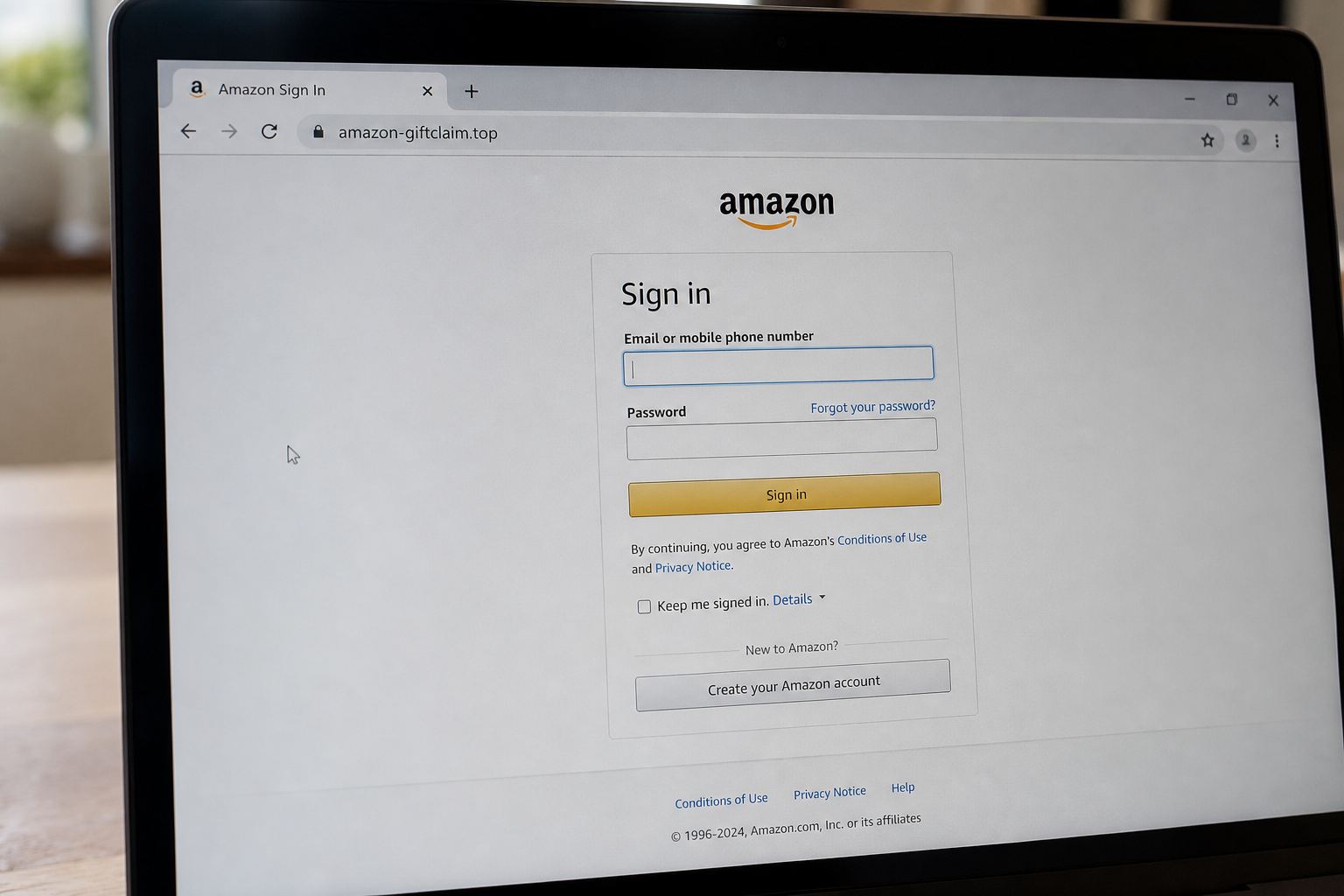
Checking whether a site is safe keeps getting confused with checking whether a connection is encrypted. Those are two different questions. Encryption covers who can eavesdrop between your browser and the server, and the padlock icon answers only that, which is why it tells you nothing useful anymore. Ownership is the question that matters, and two moves answer it: read the domain from right to left, then check how old the registration is. Both catch most fake sites in under a minute, and neither needs software you have to install.
Everything below assumes you have a link in front of you and you're deciding whether to type a password, a card number, or your address into it. That's the moment that counts. After that you're in cleanup mode.
Read the domain right to left
A web address has exactly one part that can't be faked: the registered domain, which is the label sitting immediately before the first single slash plus the ending after the final dot. Read backwards from that slash and stop after two labels. That's the site you're on, regardless of what the rest of the address says.
Take login.chase.com.account-verify.net/secure. Reading right to left from the slash gives you net, then account-verify. The site is account-verify.net, and someone bolted "login.chase.com" onto the front as a subdomain because subdomains are free and unlimited. Anyone who owns a domain can invent any subdomain they like, including one that spells out your bank's name.
Hyphens do the same job. chase-secure-login.com isn't chase.com, it's a completely separate registration that anyone could buy. And everything after the first slash is just a folder path, so bankofamerica.scamsite.com and scamsite.com/bankofamerica/ are both the scammer's server. Folder names are decoration.
One older trick still works on people even though browsers have mostly clamped down on it. Anything before an @ symbol in a URL gets treated as login credentials and ignored as a destination, so a link written as http://www.paypal.com@203.0.113.9/ sends you to 203.0.113.9. If you spot an @ in the middle of a web address, that's your answer.
Check how old the registration is
Real companies have held their domains for years. Scam domains are usually days or weeks old, because they get reported and killed quickly, so the people running them burn through fresh ones constantly. Age is the single most useful number you can pull on a stranger's website.
Look it up free at lookup.icann.org, run by the nonprofit that coordinates the domain name system itself. Paste in the domain, ignore most of the output, and find the creation date. Registrant names and addresses are usually redacted now for privacy reasons, but the creation date and the registrar normally still show.
A domain created eleven days ago that claims to be a delivery carrier or a bank is neither of those things. For anything involving money I'd treat a registration under six months old as a stop sign. It isn't proof on its own, because legitimate new businesses obviously exist, but paired with a message you didn't ask for it's usually enough to walk away.
Get the real domain from something you already trust
You can't spot a lookalike unless you know what it looks like. Pull the genuine address from something that reached you offline: the back of your debit card, a paper statement, the box a device came in, or an app you installed long before any of this started.
Try not to get it from a search engine. Paid ads sit above the real results, and buying ads against a brand name is a standard scam tactic. Typing the address by hand beats clicking anything, every time.
The padlock means almost nothing now
The lock icon only ever meant one thing: traffic between your browser and the server is encrypted. It never meant the server belonged to whoever it claimed. Certificates used to cost money and involve paperwork, which is where the trust association came from, and that stopped being true years ago.
Let's Encrypt, a nonprofit, hands out free automated certificates to more than 700 million websites, and the only thing an applicant has to do is prove control of the domain. Not identity. Not legitimacy. Just control. So the fake site has a padlock too, because getting one takes about ninety seconds.
Google saw where this was going and announced in May 2023, on the Chromium blog, that Chrome would retire the lock icon and replace it with a neutral settings-style control, specifically because people were reading it as a trust badge. A missing padlock is still a bad sign. A present one is no sign at all.
Letters that aren't the letters you think
Domain names can contain non-Latin characters, and some of those are visually identical to Latin ones. A Cyrillic "a" renders the same as a Latin "a" in most fonts. That's the basis of what's called a homograph attack, and it's been used for real: a fake Wikipedia domain built on the Cyrillic swap, and in 2017 a lookalike Adobe domain using a b with a dot beneath it, which pushed malware.
Browsers fought back. Chrome, Safari, and Edge now display suspicious mixed-script names in their raw encoded form, which always begins with xn--. The practical rule is short. If you see xn-- anywhere in the address bar, you're on a domain that's pretending to be spelled differently than it actually is.
Endings that mean something, and endings that don't
A.gov address is one of the few things you can genuinely lean on. CISA, part of the Department of Homeland Security, runs the.gov registry, and only verified US government organizations can hold one. Applications get checked against Census Bureau classifications for what counts as a government, and a senior official at the organization has to authorize the request. So irs.gov is the IRS. Something like irs-refund-portal.com is a stranger, whatever the seal at the top of the page looks like.
Everything else is open season. A.org doesn't mean nonprofit, and the newer endings sell for a couple of dollars to anyone with a card. Don't read intent into the ending unless it's.gov.mil, or.edu.
When the link arrived as a QR code
QR codes are the hard case, because the address stays hidden until you've already opened it. You don't have to scan blind, though. Our QR code checker decodes a photo of the code in your browser and shows you the destination as plain text, so you can run the right-to-left check before anything loads. It's the automated version of this whole page.
That matters most with codes printed on cards inside parcels nobody ordered, where the card is the actual scam and the package is just the delivery method. If you already scanned one and it's been nagging at you since, the realistic recovery steps are shorter than you'd expect.
Signals worth less than people claim
- Typos and clumsy grammar. That tell is finished. Translation tools and chatbots write clean English now, and plenty of real small businesses write badly.
- Professional design. Cloned pages are copied wholesale from the original.
- Reviews displayed on the site. Written by whoever built the site. The FTC found fabricated testimonials on cloned car dealership websites, alongside copied logos and listings.
- A contact page with a street address and phone number. Costs nothing to type, and nobody checks.
- Seeing "https" at the front. Covered above, and it stopped meaning anything a while ago.
The thirty-second routine
- Find the first single slash, read two labels backwards from it, and ask whether that's the company.
- Paste the domain into lookup.icann.org and check the creation date.
- Scan the address for @ or xn--.
- Compare against the address printed on your card or statement, not against your memory of it.
- If anything feels off, close the tab and reach the company by typing their address yourself.
If you already typed something in
Change that password everywhere you reused it, and start with your email account, because email resets everything else you own. If it was a card number, call the bank using the number printed on the card and ask for a replacement rather than a fraud flag. After that, filing matters, and which agency handles it depends on what actually happened.
None of this catches a genuine site that's been broken into, where the domain really is the right one and the server is serving someone else's code. That's far rarer than lookalike domains, and no amount of address-bar reading will reveal it. Domain reading solves the common case, and the common case is nearly all of them.
Try it right now, before you close the tab. Open the last text or email that asked you to click something, copy the domain out of it, and paste it into lookup.icann.org. Read the creation date. Practice on a link you already trust, and the whole check takes ten seconds on the day it matters.
Quick answers
- HTTPS means it is safe?
- It means the page is encrypted. Scam shops use HTTPS too.
- The name says Amazon.
- amazon-giftclaim.top is not Amazon.
This is general safety information, not legal advice. Scams change. If you need an official desk: FTC ReportFraud or IC3.